
What happened to Feather Client? The Dawn migration
In the first-party check recorded for August 13, 2026, feathermc.com still explained that Feather was acquired by InPvP and that users were being moved to Dawn. That is why a search for Feather Client can now end on a product with a different name.
Dawn is the current Feather-related destination, but it should not be treated as proof that every old Feather file, profile, mod, or cosmetic transfers unchanged. Start from the official source chain, create a clean profile, and migrate only data you understand.
Feather and Dawn at a glance
The migration is more than a download redirect, but it does not erase the historical name from the web.
| Question | Feather | Dawn |
|---|---|---|
| Where is the current consumer download? | Official page redirects away | dawn.gg download section |
| What name appears in old guides? | Feather Client | May not be mentioned |
| What version is currently displayed? | No separate desktop version shown | No stable public version string exposed; recheck the official Dawn page before installing |
| Can old files be assumed compatible? | No | Use current profiles and documented support |
Why Feather Client still appears in search results
If you searched “what happened to Feather Client,” start with the current first-party message rather than an old video or mirror. Search engines retain old brand pages, videos, Reddit threads, mod tutorials, screenshots, cape resources, and profile discussions long after a product changes ownership or name. Users also continue typing familiar queries such as Feather Client download, Feather launcher, and Feather 1.8.9.
Those results describe different moments in the product's history. Check the publication date, destination domain, file source, and whether a current first-party page confirms the instructions. A 2022 video can explain an old interface accurately while still being the wrong installation method in 2026.
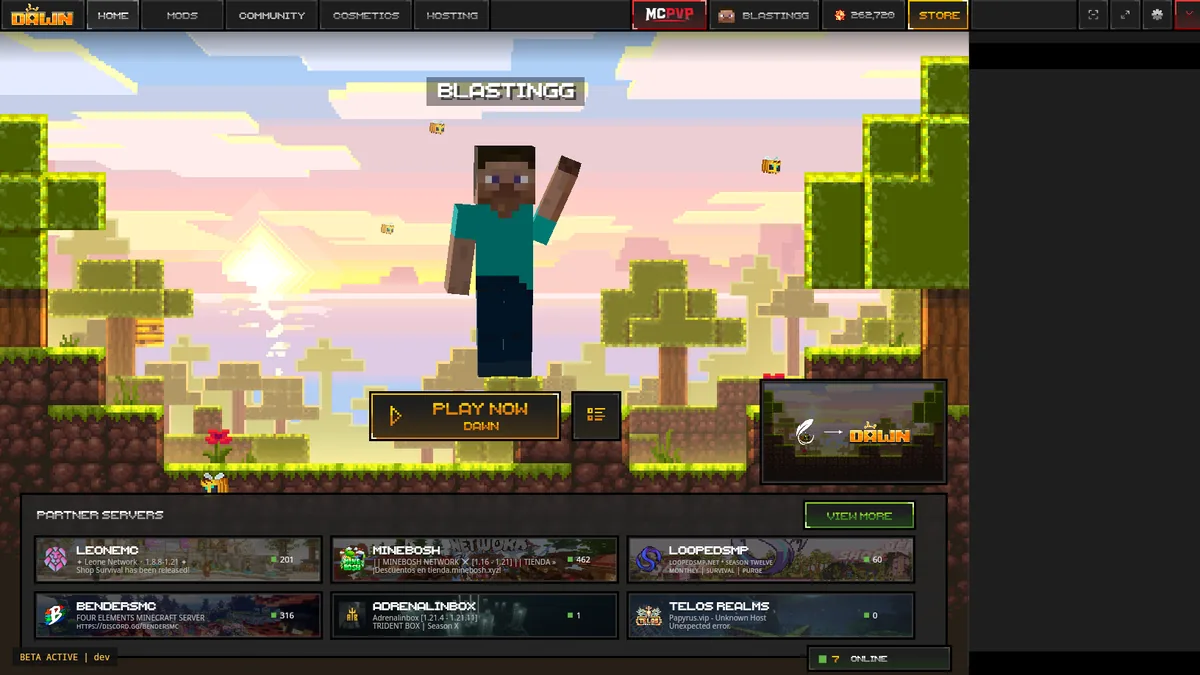
Can you download Feather without Dawn?
The question “can you download Feather without Dawn?” is answered by the current official route, not by an unverified filename. The first-party Feather page checked for this guide does not present a separate maintained consumer Feather desktop launcher. It tells users they are moving to Dawn and routes downloads there. That makes 'Feather without Dawn' an unsupported path rather than a hidden official option.
Old executables or community remakes may exist elsewhere, but a familiar project name does not make them first-party. They can be outdated, incompatible with current authentication, or repackaged. This site does not provide those mirrors.
What happens to profiles, mods, and cosmetics
Do not assume all legacy settings migrate automatically. Back up world saves, screenshots, server lists, keybinds, and mod configuration before changing launchers. Recreate a clean profile in Dawn, verify a base launch, then move only the data you understand.
Cosmetics and account entitlements depend on the current product's account and service policies. A third-party 'all cosmetics free' file cannot legitimately create server-side ownership. Cape PNG downloads can also be unrelated to an account entitlement and should not be treated as official unlocks.
- Back up user-created data before migration.
- Reinstall compatible mods from their project sources.
- Do not import unknown account tokens or complete profile archives.
- Check Dawn support for product-specific entitlement questions.
How this guide handles future Dawn updates
The visible version, supported platforms, and download links are checked against first-party pages. We record the date because a live launcher can change faster than a static guide. We do not guess release notes, file sizes, or support for Minecraft versions that are not exposed by the current source.
Keep the application version separate from Minecraft profile versions. The current Dawn page checked on August 13, 2026 did not expose a stable public application version string, and a Minecraft 1.21 mod does not become compatible merely because the launcher changes. Recheck the official page before installing.
How to confirm a future Feather Client Dawn change
A future Feather Client Dawn announcement should be checked in a predictable order. Start with feathermc.com to see whether the migration message or destination changed. Then inspect dawn.gg for the current product name, platform selector, displayed version, support links, and publisher context. Finally, compare any new installer or library route with the first-party link that led to it.
Do not treat a social post, copied screenshot, search snippet, or repository title as a replacement for that chain. Those sources can alert you to a change, but the product pages should confirm what users are expected to download. If first-party sources disagree, pause before installing and use the official support channel rather than choosing the result with the newest date.
The same method applies when old Feather branding reappears in a file or interface. It may be a retained asset, a compatibility component, a historical page, or a community project. Identify who publishes it, what product it belongs to, and whether the current Feather-to-Dawn route endorses it.
For account or entitlement questions, use Dawn's current support channel because this independent guide cannot inspect private account records. Keep screenshots of the visible error, the profile name, and the time it occurred, but remove email addresses, tokens, and personal identifiers before sharing them. A migration problem should be described as an account, profile, cosmetic, download, or launcher issue so support can route it correctly.
For profile migration, copy only data you recognize. Worlds, screenshots, resource packs, server lists, and keybind files have different purposes from account databases, native libraries, or scripts. Build a new Dawn profile first, then move user data in small groups and launch after each group. This process shows whether the issue comes from Dawn itself or a legacy Feather configuration.
- Confirm the migration statement at the Feather domain.
- Confirm current platforms and version at the Dawn domain.
- Follow download destinations only from those first-party pages.
- Record the check date and avoid claims that the source does not expose.
What happened to Feather Client? FAQ
Clear answers about the Feather-to-Dawn migration, old files, profiles, and downloads.
What happened to Feather Client?
Feather's official website says the client was acquired by InPvP and users are being moved to Dawn, so current downloads follow the Dawn route.
Why is Feather Client Dawn now?
The first-party migration message explains the ownership change and directs users to Dawn. A new product name does not make every historical file or profile identical.
Is Dawn the same as old Feather Client?
Treat Dawn as the current Feather-related destination, not as proof that every old file, feature, profile, or mod is the same or automatically compatible.
Can I still use an old Feather profile?
Back it up, test a clean Dawn profile, and move only recognized worlds, screenshots, server lists, settings, and compatible mods. Do not import unknown account databases or tokens.
Is Dawn free?
Dawn describes its launcher and client as free. Minecraft ownership and account access remain separate from the launcher download.